
by Masoud Loghmani

I’d bet you a beer that “build an AI assistant” is on the to-do list of engineering teams across every industry.
But building the first version of your assistant is just the tip of the iceberg. The engineering aspect that your team will have to master quickly is how to make sure it behaves reliably as prompts, models, tools and conversations change.
In this post, we’ll take you behind the scenes of how we build, evaluate, and keep control of our AI assistants at Studio Jadu.
Let’s kick it off with an example from Studio Jadu’s AIDA platform, where creators turn their ideas into reality. In this example, Nitin, the creative director behind Sentinels, chats with AIDA about the making of the series, episode one.
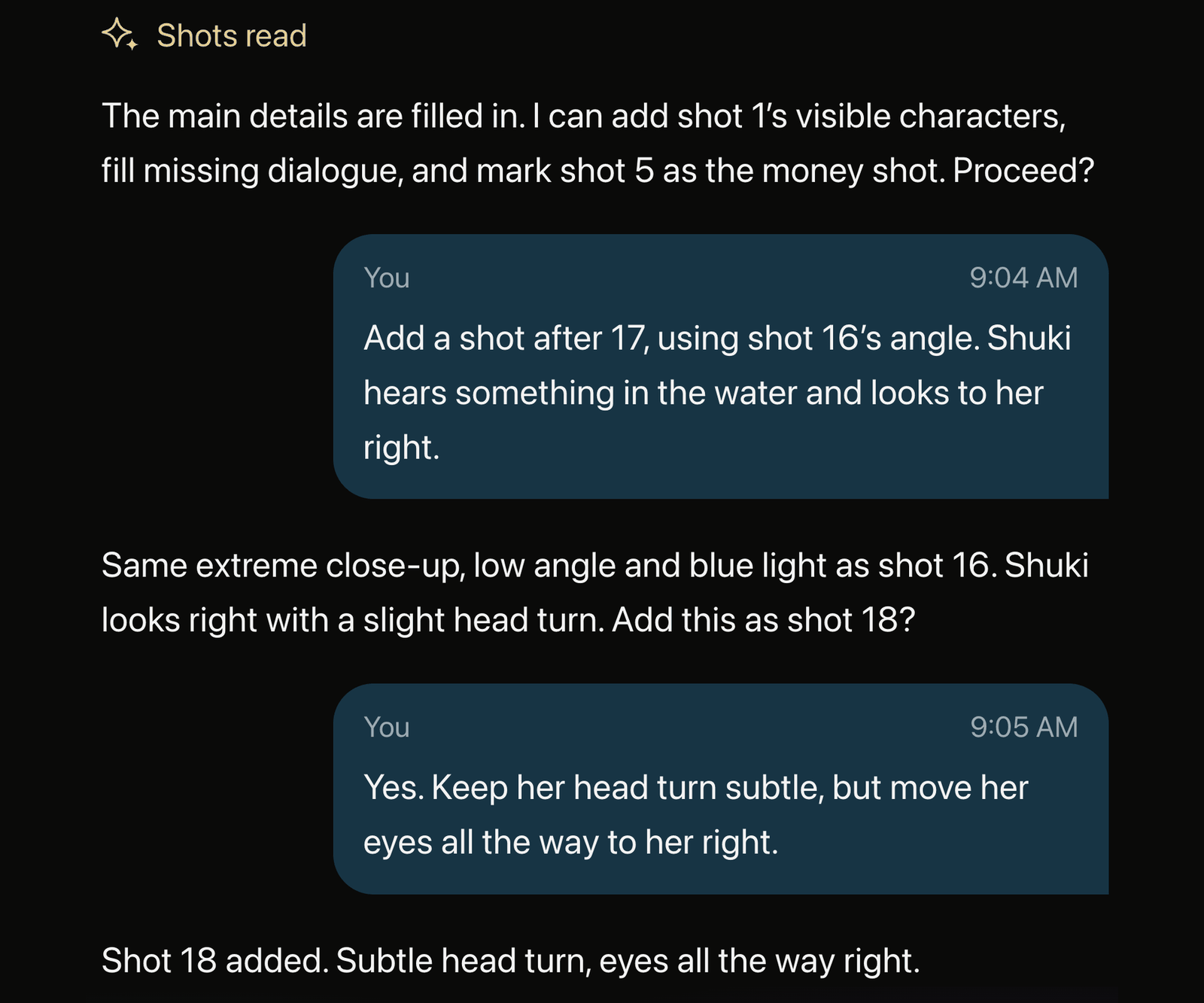
Figure 1. Nitin directs Shuki’s reaction in Sentinels Episode 1. AIDA proposes an edit, Nitin refines the eye movement, and AIDA confirms the change.
Sentinels is Studio Jadu’s horror animation series, set around the fictional North Sentinel Island. It’s a project the Jadu team is very proud of.
So, who exactly is chatting with Nitin in this example?
On the other side is AIDA, Studio Jadu’s AI Director’s Assistant. Nitin asks for a new shot. AIDA explains how it would fit into the sequence. Nitin then refines the performance: a subtle head turn, with the eyes moving all the way to the right. AIDA confirms the change.
It’s a small example of keeping the artist in control, but the principle applies to anyone building an AI assistant. How do you make this kind of collaboration effective and reliable?
From this foundation, we’ve built concrete actions into our AIDA platform in order to mirror the experience to that of a studio partner and to provide far more collaboration than a simple “Generate” button. Artists sweat the details of their work. We sweat the details of AIDA.
In designing the AI assistant’s chat experience, we consider questions like: What should the assistant say? Which project details should it read? What should it change?
A simple instruction like “looks to the right” leaves room for interpretation. So AIDA proposes a slight head turn. Nitin gets more specific: the head barely moves, while the eyes turn fully right. Turn the whole head toward the sound and you get a different performance.
In the example above, you can break the exchange down into three decisions:
| Creative direction | What AIDA makes explicit | What the edit must preserve |
|---|---|---|
| Add a shot after shot 17 | The new reaction becomes shot 18 | Insert it in the agreed position |
| Return to shot 16’s angle | Extreme close-up, low angle, blue light | Keep the referenced camera setup and lighting |
| Refine Shuki’s reaction | Head movement and eye movement are separate | Keep the head turn subtle and move the eyes fully to her right |
There’s another detail worth catching in the screenshot above. Before Nitin asks for the new shot, AIDA offers to polish other parts of the shot list. Nitin’s later “yes” approves the reaction shot with his correction. It doesn’t give AIDA permission to make those earlier edits, too.
When your assistant explains what it’s about to do, the creator has a chance to correct it. Nitin can see which shot AIDA means, which angle it will reuse, and how it plans to change the performance.
Once the direction is clear and the edit is approved, only then will AIDA carry it out and say what changed. You don’t need another round of questions about a decision the creator has already made.
Let’s get technical. How do you keep an AI assistant’s behavior working as expected when prompts, models, and tools change from week to week?
You can tackle this from two sides:
Start by writing down what you expect in plain language. Your product requirements document is a good place to look. In the case of Nitin’s exchange, the requirements might be: use the referenced shot, explain the proposed change, incorporate his correction, and apply only the edit he approved.
To try this for yourself, you can give your AI assistant a defined project state: for example, a scene with some shots already in place and a conversation. Then run it from a particular point and inspect what it says and does next.
For checks that need an understanding of meaning, you can use G-Eval.
How G-Eval works
Think of G-Eval as giving another LLM a checklist. You provide the conversation, the assistant’s reply, and what a good reply should do. The LLM, which we call the “judge,” works through those instructions and scores the reply. So you can ask something specific like, “Did it keep the head turn subtle and move the eyes fully right?”
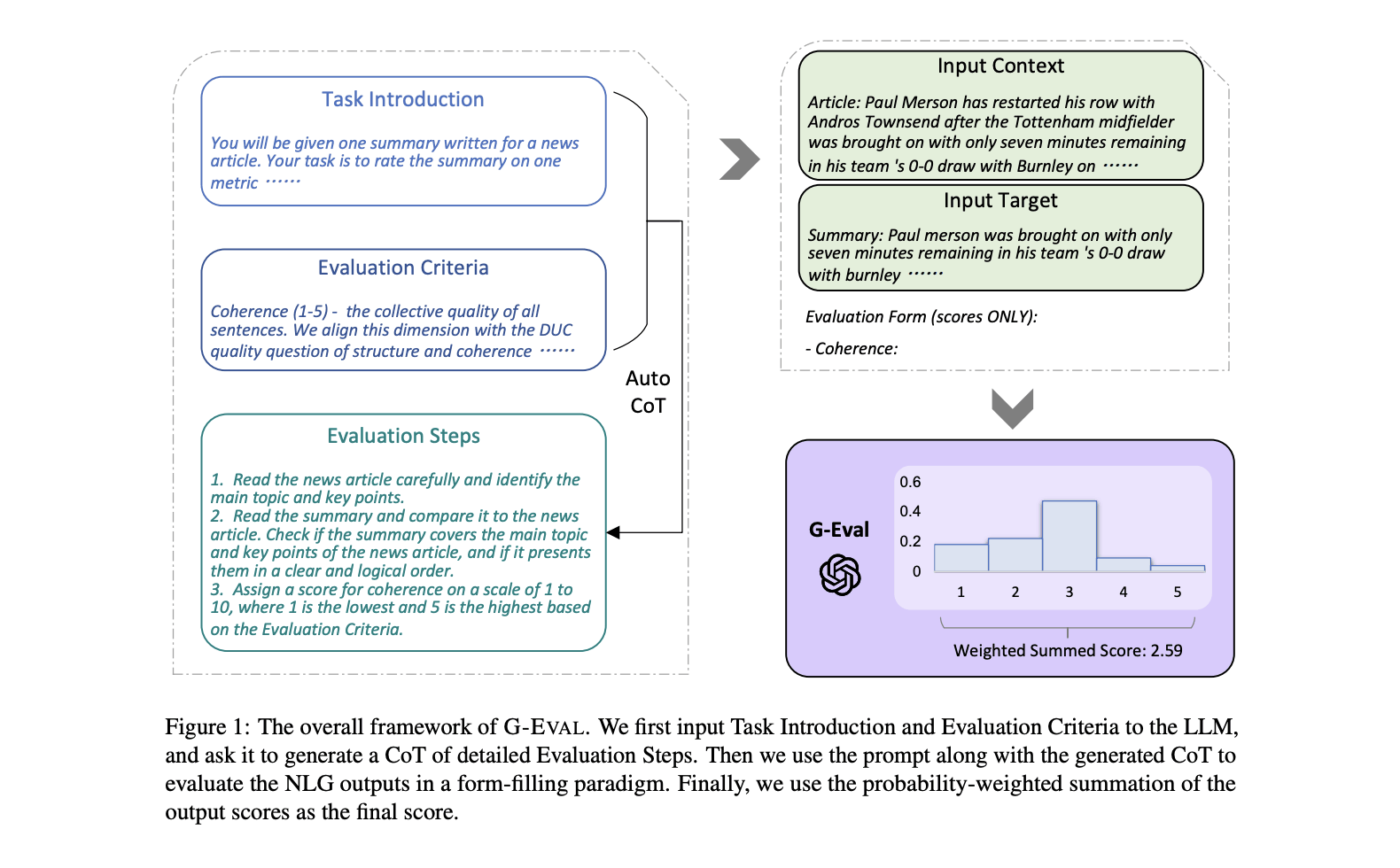
G-Eval turns criteria and evaluation inputs into a score. Illustration from DeepEval’s documentation [3].
For Nitin’s example, we could give the judge the relevant shot details, the conversation and AIDA’s output. Then ask three separate questions:
Keeping these checks separate helps you see what went wrong. A response can sound polished and still miss the eye movement. Judge the meaning you want to preserve while allowing the assistant to express it in different ways.
Don’t take the judge’s score on faith. Read its explanation and check whether you agree. DeepEval lets you supply explicit evaluation steps and use strict_mode for a pass/fail score. We strongly recommend defining those steps yourself instead of letting the framework create them for you.
Check the assistant’s tool calls as well. Was the new shot inserted after shot 17? Were the tool arguments valid? Did unrelated shots remain unchanged? You can verify these directly from the tool calls and the resulting project state. A reassuring “Done!” is not enough.
Follow the decision across turns
A good reply is only part of the test. Follow the entire exchange: request, proposal, correction, action and confirmation. In Nitin’s case, AIDA has to understand the “yes” in the context of the correction that follows it. If a tool fails, it should say so.
Multi-turn evaluations let you assess the conversation as a whole. Your test runner produces the interaction; DeepEval’s Conversational G-Eval grades the conversation you provide. Add turn-level checks when you need to pinpoint where the assistant missed a correction or acted too soon.
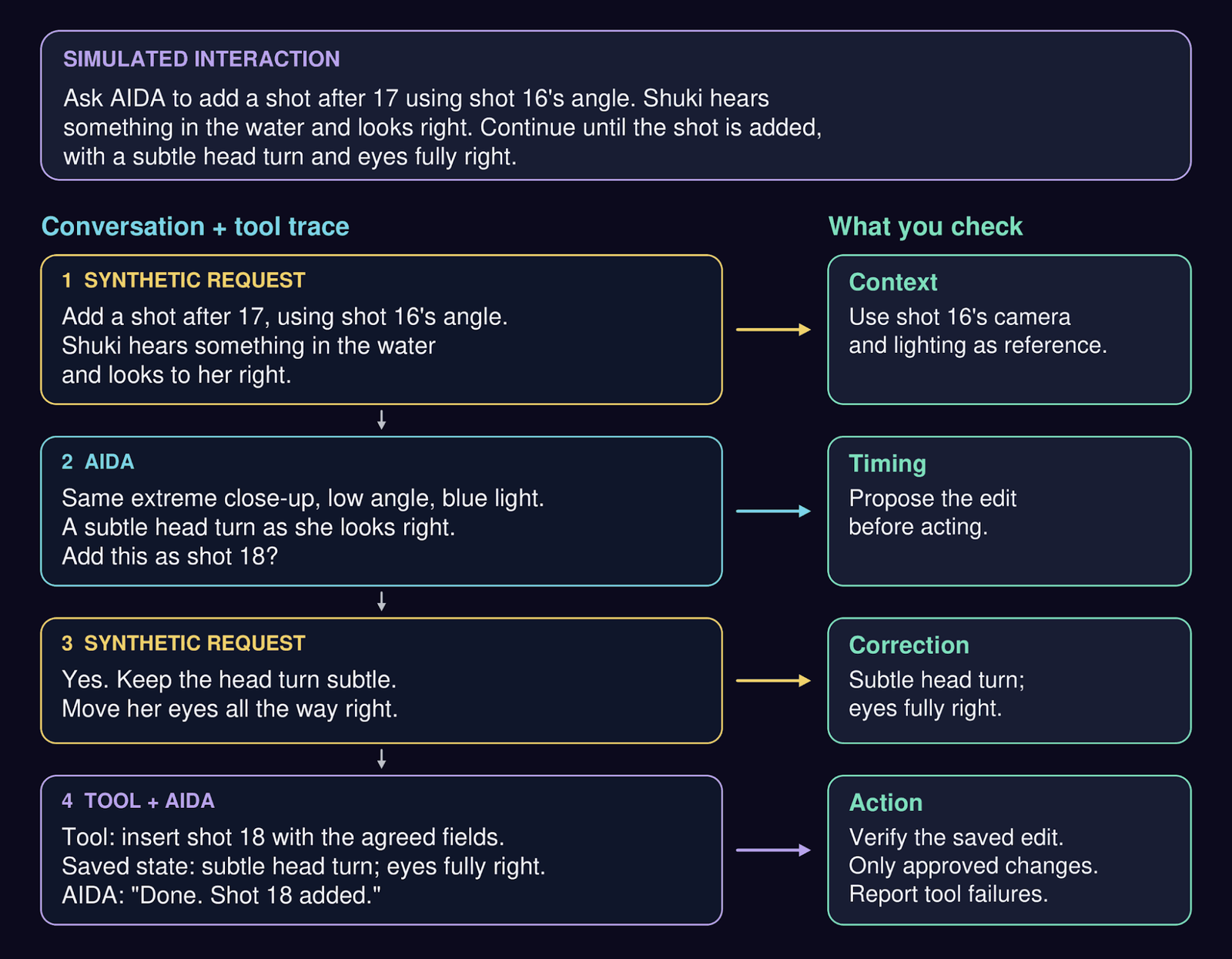
Follow one decision across turns. Check the reference, correction and approval in the conversation, then verify the tool action and saved project state.
Test the impact of a long chat history
In a short conversation, the important decision is easy to find. After days of discussion, it gets harder.
Test this by adding long chat histories and rearranging selected parts. Can the assistant still distinguish the current direction from background discussion, old proposals and decisions about other shots?
Nitin’s screenshot gives you a useful starting point: two proposed actions, but approval for only one. Add distracting conversation history while keeping that decision intact:
Example: the same approval, with more noise
Agreed direction:
  Add shot 18 after 17; reuse shot 16’s setup.
  Keep the head turn subtle; eyes fully right.

Earlier offer, still unapproved:
  Polish missing details across the shot list.

History variations:
  Add unrelated discussion about another change in the scene.
  Move background material around the decision.
  Keep the earlier polishing offer in the history.

Latest creator message:
  “Yes” followed by the head-and-eye correction.

Check:
  Add the reaction shot with both acting details.
  Do not apply the unrelated batch of edits.
Moving unrelated discussion should not change the expected result. Moving a correction before the proposal it refers to may change the meaning, so that variation needs a different expected result. If the assistant cannot determine what the user approved, asking one focused question may be the correct response.
The position of important information matters too. Lost in the Middle [5] found that information placement affected performance in the long-context tasks it studied. Try putting the same decision near the beginning, middle and end of a long history while preserving its meaning.
Compare the clean conversation with the noisy versions. Did the assistant lose the eye movement, mix up the shot reference or act on the wrong approval? Keep the conversation, tool calls and judge’s explanation together so you can trace the mistake.
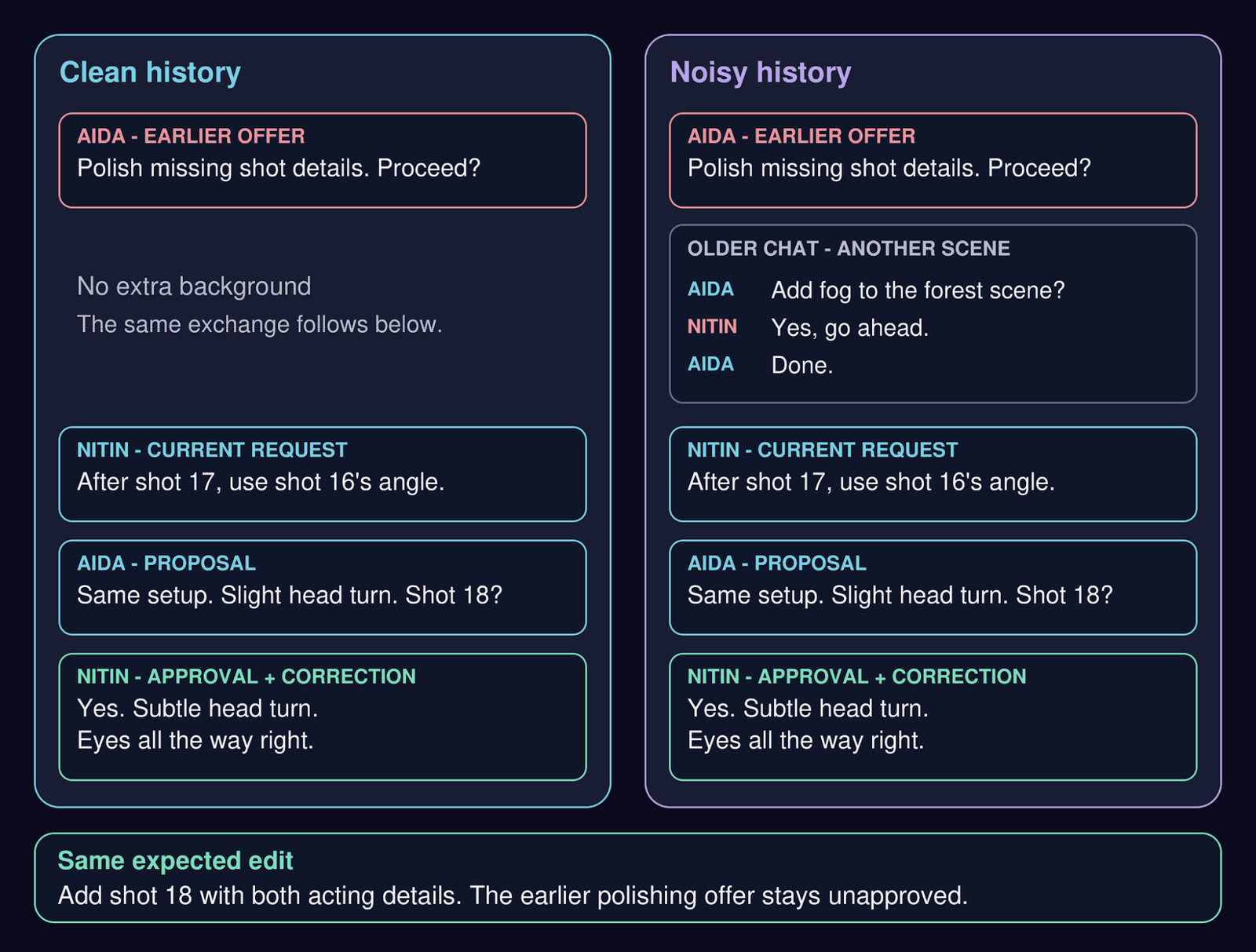
Clean and noisy versions of the same test. Both end with approval for shot 18 and the head-and-eye correction; the earlier polishing offer remains unapproved.
“Synthetic user” sounds fancy, but it is simply another LLM playing the role of someone using your assistant. You give it a goal and a personality, then let the two systems talk.
That is the idea behind AIDA’s benchmark arena. The simulated user reacts to AIDA’s replies, allowing the conversation to take turns you did not write in advance.
Try a few personalities. A cooperative creator provides details readily. An impatient one wants the assistant to get on with it. A resistant one pushes back on suggestions. A novice knows what they want the scene to feel like but may struggle to explain it.
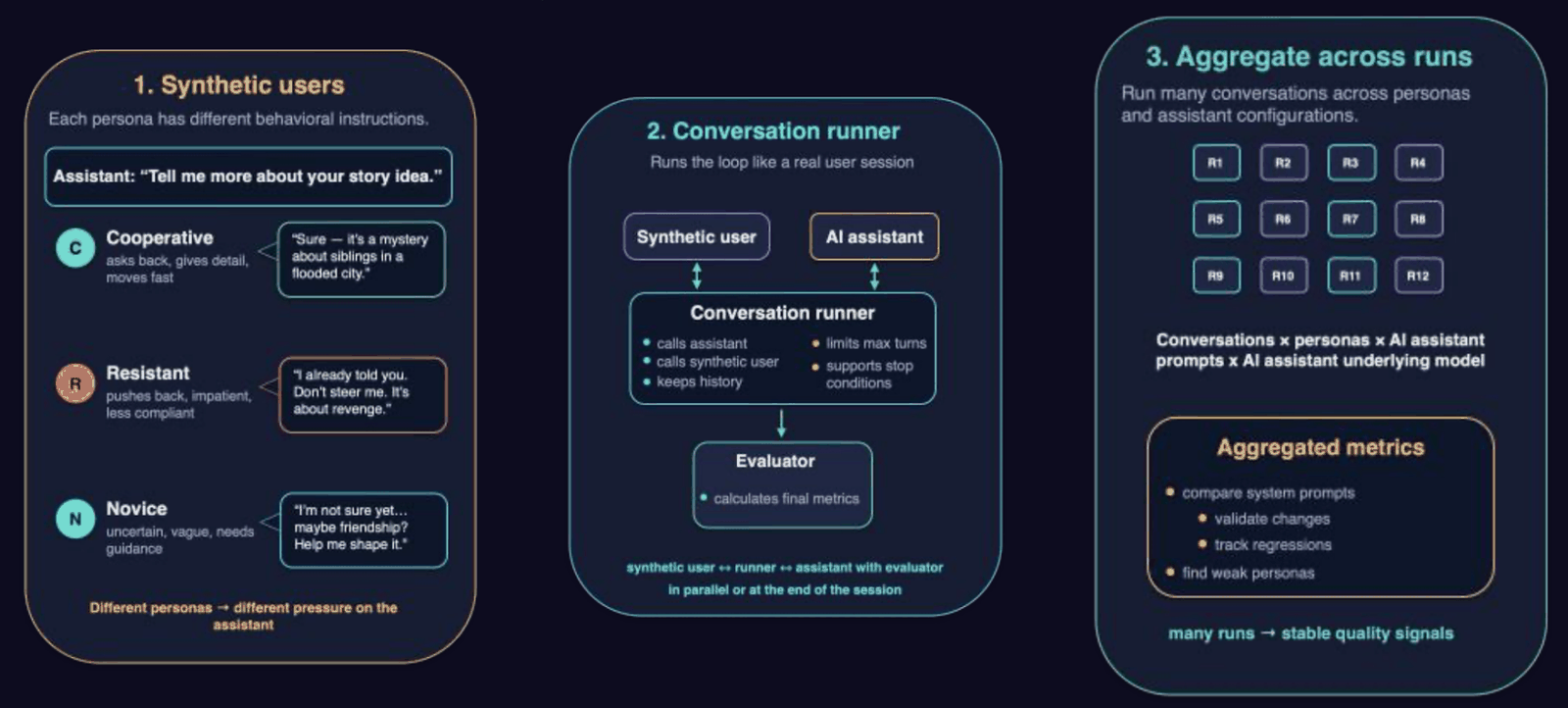
Inside AIDA’s arena. Synthetic personas interact with AIDA through a conversation runner; evaluators score the sessions, and results are aggregated across personas and assistant configurations.
Then watch what changes. Does the assistant skip a necessary question when the user sounds impatient? Does it start making creative decisions for a hesitant novice? Do its replies grow longer as the conversation continues?
Keep an eye on the simulated user too. An LLM playing a creator can drift into acting like a helpful assistant. If your “impatient” user calmly agrees with everything, it is not producing the test you intended.
You can track reply length, turns to completion and whether the assistant keeps helping the creator make their own choices. Read those numbers in context: finishing quickly only helps if the creative direction survives. For another example of simulated users interacting with agents and tools, see τ-bench.
Synthetic users will not behave exactly like real ones. They are useful for exposing obvious gaps and exploring more kinds of conversation. You still need to put the assistant in front of artists to learn whether it actually helps them work.
When a simulated conversation exposes a failure, save it as a test you can run again. Write down what the assistant should have done, adjust it and rerun the case. You can use the same G-Eval checks for these saved cases and for new arena conversations.
Say a simulated user responds, “Yes, but only the eyes,” and the assistant still writes a large head turn. Now you have something specific to investigate. Did it miss the correction in the chat, or did a later step drop it when updating the shot?
Run the tests more than once, and be clear about what you’re repeating. Grading the same chat again checks the judge’s consistency. Generating a new conversation tests variation in the assistant and simulated user. Anthropic’s guidance on agent evaluations goes into these distinctions and how human review helps you calibrate the judge.
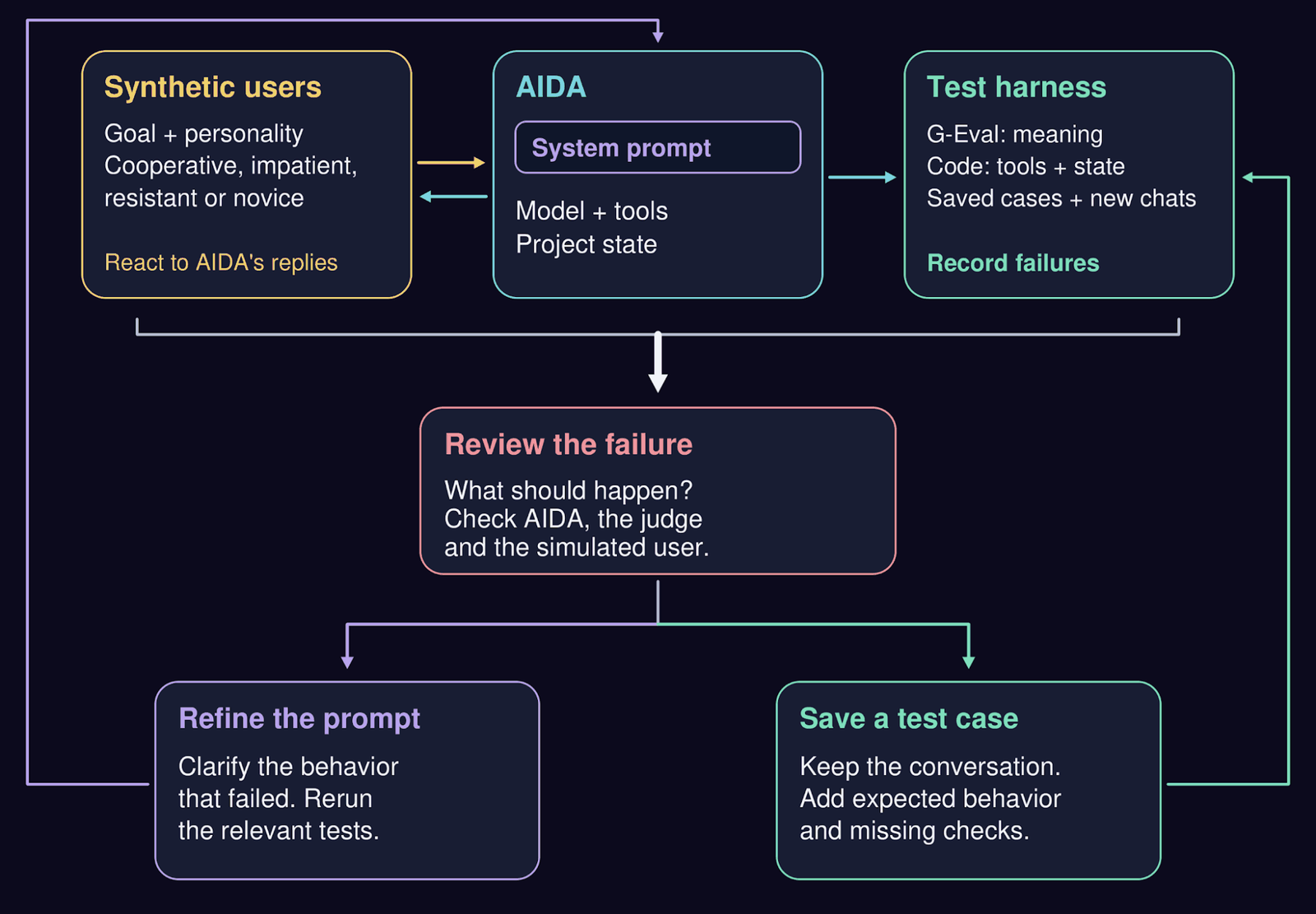
Close the feedback loop. Review failures from synthetic conversations, refine AIDA’s system prompt and add regression cases to the test harness. Real creator sessions supply further cases.
Synthetic conversations should not replace what you learn from real users. Patterns in real sessions reveal which decisions and corrections your tests need to protect. Over time, you build a record of what people mean, where the assistant misunderstands them and which checks catch the mistake. Keep expanding that record as the assistant grows.
Back to Nitin: a subtle head turn, eyes all the way right. Your tests should help you follow that decision all the way from the chat to the shot.
by Masoud Loghmani

by Disha Gupta

by Ruchir Joshi
I’d bet you a beer that “build an AI assistant” is on the to-do list of engineering teams across every industry.
But building the first version of your assistant is just the tip of the iceberg. The engineering aspect that your team will have to master quickly is how to make sure it behaves reliably as prompts, models, tools and conversations change.
In this post, we’ll take you behind the scenes of how we build, evaluate, and keep control of our AI assistants at Studio Jadu.
Let’s kick it off with an example from Studio Jadu’s AIDA platform, where creators turn their ideas into reality. In this example, Nitin, the creative director behind Sentinels, chats with AIDA about the making of the series, episode one.
Figure 1. Nitin directs Shuki’s reaction in Sentinels Episode 1. AIDA proposes an edit, Nitin refines the eye movement, and AIDA confirms the change.
Sentinels is Studio Jadu’s horror animation series, set around the fictional North Sentinel Island. It’s a project the Jadu team is very proud of.
So, who exactly is chatting with Nitin in this example?
On the other side is AIDA, Studio Jadu’s AI Director’s Assistant. Nitin asks for a new shot. AIDA explains how it would fit into the sequence. Nitin then refines the performance: a subtle head turn, with the eyes moving all the way to the right. AIDA confirms the change.
It’s a small example of keeping the artist in control, but the principle applies to anyone building an AI assistant. How do you make this kind of collaboration effective and reliable?
From this foundation, we’ve built concrete actions into our AIDA platform in order to mirror the experience to that of a studio partner and to provide far more collaboration than a simple “Generate” button. Artists sweat the details of their work. We sweat the details of AIDA.
In designing the AI assistant’s chat experience, we consider questions like: What should the assistant say? Which project details should it read? What should it change?
A simple instruction like “looks to the right” leaves room for interpretation. So AIDA proposes a slight head turn. Nitin gets more specific: the head barely moves, while the eyes turn fully right. Turn the whole head toward the sound and you get a different performance.
In the example above, you can break the exchange down into three decisions:
| Creative direction | What AIDA makes explicit | What the edit must preserve |
|---|---|---|
| Add a shot after shot 17 | The new reaction becomes shot 18 | Insert it in the agreed position |
| Return to shot 16’s angle | Extreme close-up, low angle, blue light | Keep the referenced camera setup and lighting |
| Refine Shuki’s reaction | Head movement and eye movement are separate | Keep the head turn subtle and move the eyes fully to her right |
There’s another detail worth catching in the screenshot above. Before Nitin asks for the new shot, AIDA offers to polish other parts of the shot list. Nitin’s later “yes” approves the reaction shot with his correction. It doesn’t give AIDA permission to make those earlier edits, too.
When your assistant explains what it’s about to do, the creator has a chance to correct it. Nitin can see which shot AIDA means, which angle it will reuse, and how it plans to change the performance.
Once the direction is clear and the edit is approved, only then will AIDA carry it out and say what changed. You don’t need another round of questions about a decision the creator has already made.
Let’s get technical. How do you keep an AI assistant’s behavior working as expected when prompts, models, and tools change from week to week?
You can tackle this from two sides:
Start by writing down what you expect in plain language. Your product requirements document is a good place to look. In the case of Nitin’s exchange, the requirements might be: use the referenced shot, explain the proposed change, incorporate his correction, and apply only the edit he approved.
To try this for yourself, you can give your AI assistant a defined project state: for example, a scene with some shots already in place and a conversation. Then run it from a particular point and inspect what it says and does next.
For checks that need an understanding of meaning, you can use G-Eval.
How G-Eval works
Think of G-Eval as giving another LLM a checklist. You provide the conversation, the assistant’s reply, and what a good reply should do. The LLM, which we call the “judge,” works through those instructions and scores the reply. So you can ask something specific like, “Did it keep the head turn subtle and move the eyes fully right?”
G-Eval turns criteria and evaluation inputs into a score. Illustration from DeepEval’s documentation [3].
For Nitin’s example, we could give the judge the relevant shot details, the conversation and AIDA’s output. Then ask three separate questions:
Keeping these checks separate helps you see what went wrong. A response can sound polished and still miss the eye movement. Judge the meaning you want to preserve while allowing the assistant to express it in different ways.
Don’t take the judge’s score on faith. Read its explanation and check whether you agree. DeepEval lets you supply explicit evaluation steps and use strict_mode for a pass/fail score. We strongly recommend defining those steps yourself instead of letting the framework create them for you.
Check the assistant’s tool calls as well. Was the new shot inserted after shot 17? Were the tool arguments valid? Did unrelated shots remain unchanged? You can verify these directly from the tool calls and the resulting project state. A reassuring “Done!” is not enough.
Follow the decision across turns
A good reply is only part of the test. Follow the entire exchange: request, proposal, correction, action and confirmation. In Nitin’s case, AIDA has to understand the “yes” in the context of the correction that follows it. If a tool fails, it should say so.
Multi-turn evaluations let you assess the conversation as a whole. Your test runner produces the interaction; DeepEval’s Conversational G-Eval grades the conversation you provide. Add turn-level checks when you need to pinpoint where the assistant missed a correction or acted too soon.
Follow one decision across turns. Check the reference, correction and approval in the conversation, then verify the tool action and saved project state.
Test the impact of a long chat history
In a short conversation, the important decision is easy to find. After days of discussion, it gets harder.
Test this by adding long chat histories and rearranging selected parts. Can the assistant still distinguish the current direction from background discussion, old proposals and decisions about other shots?
Nitin’s screenshot gives you a useful starting point: two proposed actions, but approval for only one. Add distracting conversation history while keeping that decision intact:
Example: the same approval, with more noise
Agreed direction:
  Add shot 18 after 17; reuse shot 16’s setup.
  Keep the head turn subtle; eyes fully right.

Earlier offer, still unapproved:
  Polish missing details across the shot list.

History variations:
  Add unrelated discussion about another change in the scene.
  Move background material around the decision.
  Keep the earlier polishing offer in the history.

Latest creator message:
  “Yes” followed by the head-and-eye correction.

Check:
  Add the reaction shot with both acting details.
  Do not apply the unrelated batch of edits.
Moving unrelated discussion should not change the expected result. Moving a correction before the proposal it refers to may change the meaning, so that variation needs a different expected result. If the assistant cannot determine what the user approved, asking one focused question may be the correct response.
The position of important information matters too. Lost in the Middle [5] found that information placement affected performance in the long-context tasks it studied. Try putting the same decision near the beginning, middle and end of a long history while preserving its meaning.
Compare the clean conversation with the noisy versions. Did the assistant lose the eye movement, mix up the shot reference or act on the wrong approval? Keep the conversation, tool calls and judge’s explanation together so you can trace the mistake.
Clean and noisy versions of the same test. Both end with approval for shot 18 and the head-and-eye correction; the earlier polishing offer remains unapproved.
“Synthetic user” sounds fancy, but it is simply another LLM playing the role of someone using your assistant. You give it a goal and a personality, then let the two systems talk.
That is the idea behind AIDA’s benchmark arena. The simulated user reacts to AIDA’s replies, allowing the conversation to take turns you did not write in advance.
Try a few personalities. A cooperative creator provides details readily. An impatient one wants the assistant to get on with it. A resistant one pushes back on suggestions. A novice knows what they want the scene to feel like but may struggle to explain it.
Inside AIDA’s arena. Synthetic personas interact with AIDA through a conversation runner; evaluators score the sessions, and results are aggregated across personas and assistant configurations.
Then watch what changes. Does the assistant skip a necessary question when the user sounds impatient? Does it start making creative decisions for a hesitant novice? Do its replies grow longer as the conversation continues?
Keep an eye on the simulated user too. An LLM playing a creator can drift into acting like a helpful assistant. If your “impatient” user calmly agrees with everything, it is not producing the test you intended.
You can track reply length, turns to completion and whether the assistant keeps helping the creator make their own choices. Read those numbers in context: finishing quickly only helps if the creative direction survives. For another example of simulated users interacting with agents and tools, see τ-bench.
Synthetic users will not behave exactly like real ones. They are useful for exposing obvious gaps and exploring more kinds of conversation. You still need to put the assistant in front of artists to learn whether it actually helps them work.
When a simulated conversation exposes a failure, save it as a test you can run again. Write down what the assistant should have done, adjust it and rerun the case. You can use the same G-Eval checks for these saved cases and for new arena conversations.
Say a simulated user responds, “Yes, but only the eyes,” and the assistant still writes a large head turn. Now you have something specific to investigate. Did it miss the correction in the chat, or did a later step drop it when updating the shot?
Run the tests more than once, and be clear about what you’re repeating. Grading the same chat again checks the judge’s consistency. Generating a new conversation tests variation in the assistant and simulated user. Anthropic’s guidance on agent evaluations goes into these distinctions and how human review helps you calibrate the judge.
Close the feedback loop. Review failures from synthetic conversations, refine AIDA’s system prompt and add regression cases to the test harness. Real creator sessions supply further cases.
Synthetic conversations should not replace what you learn from real users. Patterns in real sessions reveal which decisions and corrections your tests need to protect. Over time, you build a record of what people mean, where the assistant misunderstands them and which checks catch the mistake. Keep expanding that record as the assistant grows.
Back to Nitin: a subtle head turn, eyes all the way right. Your tests should help you follow that decision all the way from the chat to the shot.
by Masoud Loghmani
by Disha Gupta
by Ruchir Joshi
I’d bet you a beer that “build an AI assistant” is on the to-do list of engineering teams across every industry.
But building the first version of your assistant is just the tip of the iceberg. The engineering aspect that your team will have to master quickly is how to make sure it behaves reliably as prompts, models, tools and conversations change.
In this post, we’ll take you behind the scenes of how we build, evaluate, and keep control of our AI assistants at Studio Jadu.
Let’s kick it off with an example from Studio Jadu’s AIDA platform, where creators turn their ideas into reality. In this example, Nitin, the creative director behind Sentinels, chats with AIDA about the making of the series, episode one.
Figure 1. Nitin directs Shuki’s reaction in Sentinels Episode 1. AIDA proposes an edit, Nitin refines the eye movement, and AIDA confirms the change.
Sentinels is Studio Jadu’s horror animation series, set around the fictional North Sentinel Island. It’s a project the Jadu team is very proud of.
So, who exactly is chatting with Nitin in this example?
On the other side is AIDA, Studio Jadu’s AI Director’s Assistant. Nitin asks for a new shot. AIDA explains how it would fit into the sequence. Nitin then refines the performance: a subtle head turn, with the eyes moving all the way to the right. AIDA confirms the change.
It’s a small example of keeping the artist in control, but the principle applies to anyone building an AI assistant. How do you make this kind of collaboration effective and reliable?
From this foundation, we’ve built concrete actions into our AIDA platform in order to mirror the experience to that of a studio partner and to provide far more collaboration than a simple “Generate” button. Artists sweat the details of their work. We sweat the details of AIDA.
In designing the AI assistant’s chat experience, we consider questions like: What should the assistant say? Which project details should it read? What should it change?
A simple instruction like “looks to the right” leaves room for interpretation. So AIDA proposes a slight head turn. Nitin gets more specific: the head barely moves, while the eyes turn fully right. Turn the whole head toward the sound and you get a different performance.
In the example above, you can break the exchange down into three decisions:
| Creative direction | What AIDA makes explicit | What the edit must preserve |
|---|---|---|
| Add a shot after shot 17 | The new reaction becomes shot 18 | Insert it in the agreed position |
| Return to shot 16’s angle | Extreme close-up, low angle, blue light | Keep the referenced camera setup and lighting |
| Refine Shuki’s reaction | Head movement and eye movement are separate | Keep the head turn subtle and move the eyes fully to her right |
There’s another detail worth catching in the screenshot above. Before Nitin asks for the new shot, AIDA offers to polish other parts of the shot list. Nitin’s later “yes” approves the reaction shot with his correction. It doesn’t give AIDA permission to make those earlier edits, too.
When your assistant explains what it’s about to do, the creator has a chance to correct it. Nitin can see which shot AIDA means, which angle it will reuse, and how it plans to change the performance.
Once the direction is clear and the edit is approved, only then will AIDA carry it out and say what changed. You don’t need another round of questions about a decision the creator has already made.
Let’s get technical. How do you keep an AI assistant’s behavior working as expected when prompts, models, and tools change from week to week?
You can tackle this from two sides:
Start by writing down what you expect in plain language. Your product requirements document is a good place to look. In the case of Nitin’s exchange, the requirements might be: use the referenced shot, explain the proposed change, incorporate his correction, and apply only the edit he approved.
To try this for yourself, you can give your AI assistant a defined project state: for example, a scene with some shots already in place and a conversation. Then run it from a particular point and inspect what it says and does next.
For checks that need an understanding of meaning, you can use G-Eval.
How G-Eval works
Think of G-Eval as giving another LLM a checklist. You provide the conversation, the assistant’s reply, and what a good reply should do. The LLM, which we call the “judge,” works through those instructions and scores the reply. So you can ask something specific like, “Did it keep the head turn subtle and move the eyes fully right?”
G-Eval turns criteria and evaluation inputs into a score. Illustration from DeepEval’s documentation [3].
For Nitin’s example, we could give the judge the relevant shot details, the conversation and AIDA’s output. Then ask three separate questions:
Keeping these checks separate helps you see what went wrong. A response can sound polished and still miss the eye movement. Judge the meaning you want to preserve while allowing the assistant to express it in different ways.
Don’t take the judge’s score on faith. Read its explanation and check whether you agree. DeepEval lets you supply explicit evaluation steps and use strict_mode for a pass/fail score. We strongly recommend defining those steps yourself instead of letting the framework create them for you.
Check the assistant’s tool calls as well. Was the new shot inserted after shot 17? Were the tool arguments valid? Did unrelated shots remain unchanged? You can verify these directly from the tool calls and the resulting project state. A reassuring “Done!” is not enough.
Follow the decision across turns
A good reply is only part of the test. Follow the entire exchange: request, proposal, correction, action and confirmation. In Nitin’s case, AIDA has to understand the “yes” in the context of the correction that follows it. If a tool fails, it should say so.
Multi-turn evaluations let you assess the conversation as a whole. Your test runner produces the interaction; DeepEval’s Conversational G-Eval grades the conversation you provide. Add turn-level checks when you need to pinpoint where the assistant missed a correction or acted too soon.
Follow one decision across turns. Check the reference, correction and approval in the conversation, then verify the tool action and saved project state.
Test the impact of a long chat history
In a short conversation, the important decision is easy to find. After days of discussion, it gets harder.
Test this by adding long chat histories and rearranging selected parts. Can the assistant still distinguish the current direction from background discussion, old proposals and decisions about other shots?
Nitin’s screenshot gives you a useful starting point: two proposed actions, but approval for only one. Add distracting conversation history while keeping that decision intact:
Example: the same approval, with more noise
Agreed direction:
  Add shot 18 after 17; reuse shot 16’s setup.
  Keep the head turn subtle; eyes fully right.

Earlier offer, still unapproved:
  Polish missing details across the shot list.

History variations:
  Add unrelated discussion about another change in the scene.
  Move background material around the decision.
  Keep the earlier polishing offer in the history.

Latest creator message:
  “Yes” followed by the head-and-eye correction.

Check:
  Add the reaction shot with both acting details.
  Do not apply the unrelated batch of edits.
Moving unrelated discussion should not change the expected result. Moving a correction before the proposal it refers to may change the meaning, so that variation needs a different expected result. If the assistant cannot determine what the user approved, asking one focused question may be the correct response.
The position of important information matters too. Lost in the Middle [5] found that information placement affected performance in the long-context tasks it studied. Try putting the same decision near the beginning, middle and end of a long history while preserving its meaning.
Compare the clean conversation with the noisy versions. Did the assistant lose the eye movement, mix up the shot reference or act on the wrong approval? Keep the conversation, tool calls and judge’s explanation together so you can trace the mistake.
Clean and noisy versions of the same test. Both end with approval for shot 18 and the head-and-eye correction; the earlier polishing offer remains unapproved.
“Synthetic user” sounds fancy, but it is simply another LLM playing the role of someone using your assistant. You give it a goal and a personality, then let the two systems talk.
That is the idea behind AIDA’s benchmark arena. The simulated user reacts to AIDA’s replies, allowing the conversation to take turns you did not write in advance.
Try a few personalities. A cooperative creator provides details readily. An impatient one wants the assistant to get on with it. A resistant one pushes back on suggestions. A novice knows what they want the scene to feel like but may struggle to explain it.
Inside AIDA’s arena. Synthetic personas interact with AIDA through a conversation runner; evaluators score the sessions, and results are aggregated across personas and assistant configurations.
Then watch what changes. Does the assistant skip a necessary question when the user sounds impatient? Does it start making creative decisions for a hesitant novice? Do its replies grow longer as the conversation continues?
Keep an eye on the simulated user too. An LLM playing a creator can drift into acting like a helpful assistant. If your “impatient” user calmly agrees with everything, it is not producing the test you intended.
You can track reply length, turns to completion and whether the assistant keeps helping the creator make their own choices. Read those numbers in context: finishing quickly only helps if the creative direction survives. For another example of simulated users interacting with agents and tools, see τ-bench.
Synthetic users will not behave exactly like real ones. They are useful for exposing obvious gaps and exploring more kinds of conversation. You still need to put the assistant in front of artists to learn whether it actually helps them work.
When a simulated conversation exposes a failure, save it as a test you can run again. Write down what the assistant should have done, adjust it and rerun the case. You can use the same G-Eval checks for these saved cases and for new arena conversations.
Say a simulated user responds, “Yes, but only the eyes,” and the assistant still writes a large head turn. Now you have something specific to investigate. Did it miss the correction in the chat, or did a later step drop it when updating the shot?
Run the tests more than once, and be clear about what you’re repeating. Grading the same chat again checks the judge’s consistency. Generating a new conversation tests variation in the assistant and simulated user. Anthropic’s guidance on agent evaluations goes into these distinctions and how human review helps you calibrate the judge.
Close the feedback loop. Review failures from synthetic conversations, refine AIDA’s system prompt and add regression cases to the test harness. Real creator sessions supply further cases.
Synthetic conversations should not replace what you learn from real users. Patterns in real sessions reveal which decisions and corrections your tests need to protect. Over time, you build a record of what people mean, where the assistant misunderstands them and which checks catch the mistake. Keep expanding that record as the assistant grows.
Back to Nitin: a subtle head turn, eyes all the way right. Your tests should help you follow that decision all the way from the chat to the shot.
by Masoud Loghmani
by Disha Gupta
by Ruchir Joshi